1-Listing Database
show databases
2-Finding the current database you’re in
db
3-Go to a particular database
use <your_db_name>
In MongoDB server, if your database is present already, using that command will navigate into your database.
But if the database is not present already, then MongoDB server is going to create the database for you. Then, it will navigate into it.
4- Get collection list
db.getCollectionNames()
5- insert data in collection name users
db.users.insert({email:'mayur@gmail.com',password:'1234',role:'Client’})
6- get all data from collection
db.users.find()
7- get all data from collection by id
db.users.findOne({"_id":ObjectId("602ce59f80d64f6e81fe7a6a")})
* Creating a Collection
Navigate into your newly created database with the use command.
Actually, there are two ways to create a collection. Let’s see both.
One way is to insert data into the collection:
db.myCollection.insert({"name": "john", "age" : 22, "location": "colombo"})
This is going to create your collection myCollection even if the collection does not exist. Then it will insert a document with name and age. These are non-capped collections.
The second way is shown below:
2.1 Creating a Non-Capped Collection
db.createCollection("myCollection")
2.2 Creating a Capped Collection
db.createCollection("mySecondCollection", {capped : true, size : 2, max : 2})
In this way, you’re going to create a collection without inserting data.
A “capped collection” has a maximum document count that prevents overflowing documents.
In this example, I have enabled capping, by setting its value to true.
The size : 2 means a limit of two megabytes, and max: 2 sets the maximum number of documents to two.
Now if you try to insert more than two documents to mySecondCollection and use the find command (which we will talk about soon), you’ll only see the most recently inserted documents. Keep in mind this doesn’t mean that the very first document has been deleted — it is just not showing.
There are three methods of inserting data.
insertOne()is used to insert a single document only.insertMany()is used to insert more than one document.insert()is used to insert documents as many as you want.
Below are some examples:
- insertOne()
db.myCollection.insertOne(
  {
    "name": "navindu",
    "age": 22
  }
)- insertMany()
db.myCollection.insertMany([
  {
    "name": "navindu",
    "age": 22
  },
  {
    "name": "kavindu",
    "age": 20
  },

  {
    "name": "john doe",
    "age": 25,
    "location": "colombo"
  }
])
The insert() method is similar to the insertMany() method.
Also, notice we have inserted a new property called location on the document for John Doe. So if you use find, then you’ll see only for john doe the location property is attached.
This can be an advantage when it comes to NoSQL databases such as MongoDB. It allows for scalability.

* Querying Data
Here’s how you can query all data from a collection:
db.myCollection.find()
If you want to see this data in a cleaner, way just add .pretty() to the end of it. This will display document in pretty-printed JSON format.
db.myCollection.find().pretty()
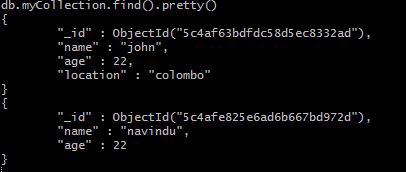
Wait...In these examples did you just notice something like _id? How did that get there?
Well, whenever you insert a document, MongoDB automatically adds an _id field which uniquely identifies each document. If you do not want it to display, just simply run the following command
db.myCollection.find({}, _id: 0).pretty()Next, we’ll look at filtering data.
If you want to display some specific document, you could specify a single detail of the document which you want to be displayed.
db.myCollection.find(
  {
    name: "john"
  }
)
Let’s say you want only to display people whose age is less than 25. You can use $lt to filter for this.
db.myCollection.find(
  {
    age : {$lt : 25}
  }
)
Similarly, $gt stands for greater than, $lte is “less than or equal to”, $gte is “greater than or equal to” and $ne is “not equal”.
* Updating documents
Let’s say you want to update someone’s address or age, how you could do it? Well, see the next example:
db.myCollection.update({age : 20}, {$set: {age: 23}})The first argument is the field of which document you want to update. Here, I specify age for the simplicity. In production environment, you could use something like the _id field.
It is always better to use something like _id to update a unique row. This is because multiple fields can have same age and name. Therefore, if you update a single row, it will affect all rows which have same name and age.

If you update a document this way with a new property, let’s say location for example, the document will be updated with the new attribute. And if you do a find, then the result will be:

If you need to remove a property from a single document, you could do something like this (let’s say you want age to be gone):
db.myCollection.update({name: "navindu"}, {$unset: age});* Removing a document
As I have mentioned earlier, when you update or delete a document, you just need specify the _id not just name, age, location.
db.myCollection.remove({name: "navindu"});* Removing a collection
db.myCollection.remove({});Note, this is not equal to the drop() method. The difference is drop() is used to remove all the documents inside a collection, but the remove() method is used to delete all the documents along with the collection itself.


No comments:
Post a Comment